Connect to the right experience
On Xbox, launch the Roblox app and search for BloxNG inside it. It's easy to take a wrong turn in the console store. BloxNG: Crash Physics by Moremore Apps, SKU 9NN0RTSJ1NBR, is a separate offline single-player game with eight vehicles. Its controller guide puts slow motion on LB and repair on Y. Those prompts belong to the Moremore game. When you join Deform Dynamics on Roblox, use the prompts in that driver's seat. Moremore Apps' Xbox Store listing
On a computer, open the Roblox link above. Check the digits after /games/ if you've got two similar-looking tabs open. Click Play and let the Roblox site hand you over to its player. First time on this computer? Follow the Roblox installation prompt, then return to the same listing. On a phone or tablet you can start inside the Roblox app and use the creator name to pick the right result.
If Play is unavailable, read the message beside the button on the account you'll actually use. An account restriction needs attention before any amount of fiddling with a controller will help. Once the road and your avatar appear, the launch has worked. If you can walk up to the car but the throttle does nothing, climb into the driver's seat and check the controls with the garage menu closed.
One more familiar name turns up around these crashes. BeamNG.drive is its own PC simulator. If you're holding a BeamNG mod file and trying to put it into Roblox, close the download and head back to the experience page. If BeamNG was the sim you wanted, here's the direct route. BeamNG.drive on the developer's site
Check device compatibility before changing settings
Find the model and operating system on the device you'll drive with. A phone can open the Roblox listing in its browser without ever loading the road. The November 2026 requirements give you a quick way to decide whether to pursue an install problem or climb aboard and try a lap.
| Device | Check before launch | If it stops here |
|---|---|---|
| Windows PC | 64-bit Windows 10 or 11 and a GPU with DirectX feature level 10 or higher | Check the GPU's feature level as well as the Windows version, especially on an older laptop. |
| Mac | macOS 10.13 or later | Compare the version in About This Mac with Roblox's desktop requirements. |
| Chromebook | ChromeOS 53 or later with Google Play Store enabled | Install the Roblox app through Play Store, then open the experience. |
| iPhone or iPad | Supported model running iOS or iPadOS 14 or later | Open Settings, then General and About. Look up both the model and the software version. |
| Android phone or tablet | Android 8.0 or later and OpenGL ES 3.0 support | If you meet the Android version, check the graphics requirement and read the device warning. |
| Console | Roblox available in the device store, with Play enabled for this experience on your account | Open Roblox itself, sign in and check the experience's launch message. |
On Android, pay attention to what the warning lets you do. If you can dismiss it, join and try steering the sedan down an empty stretch. If Roblox says your hardware can't run experiences and the message stays put, use a supported device. You can't turn down in-game graphics from a road you can't load. Once you can join, judge performance on the device in your hands. A minimum OS version won't tell you how smoothly it'll draw a hood folding at the guardrail. Roblox desktop requirements · Roblox mobile requirements
Take a one-minute symptom check
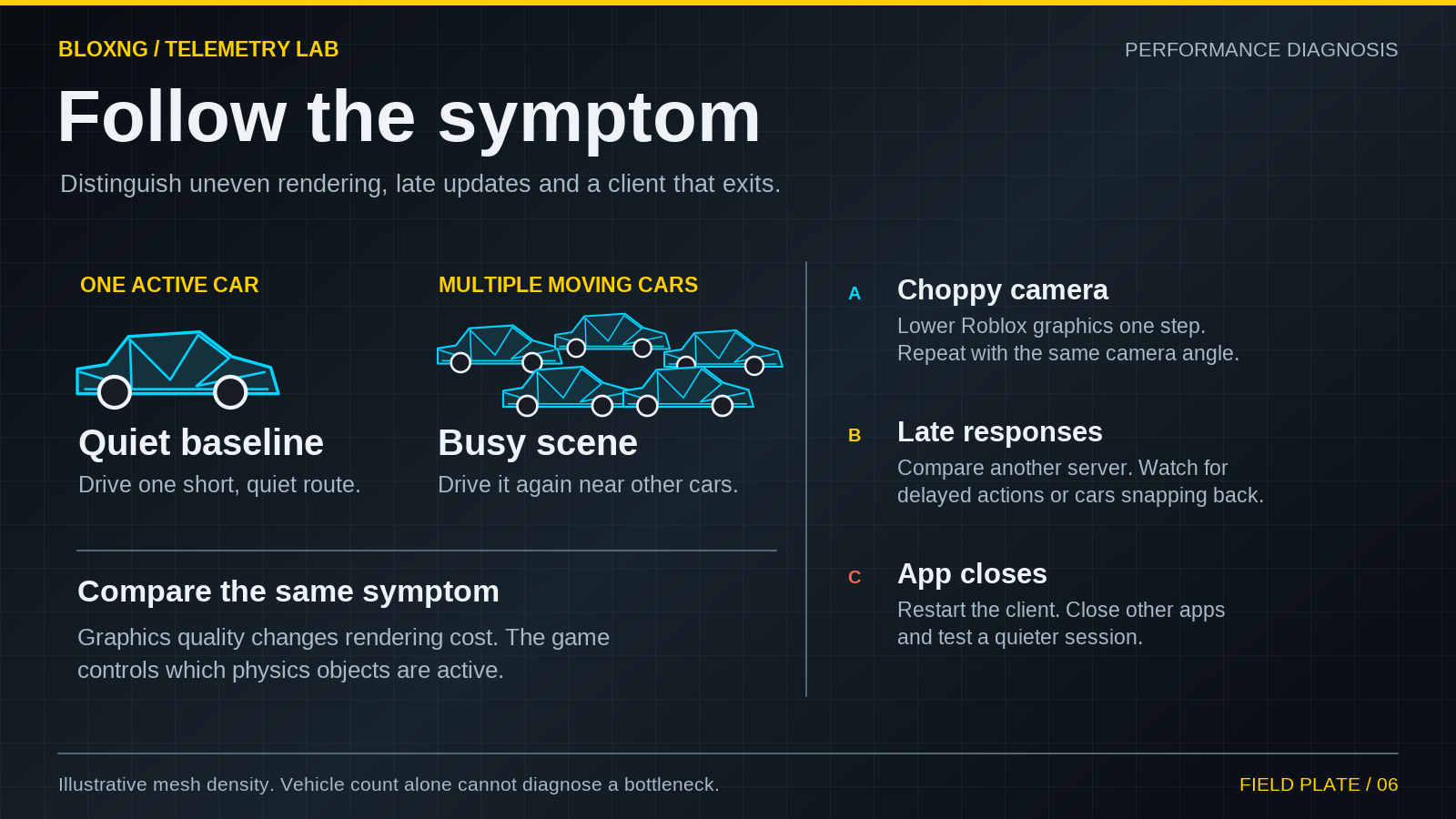
Park where you can see a stretch of rail and a passing car. Pan slowly along the posts. If the whole rail sticks and then lurches sideways, start with graphics. Now hold the camera still. Say a passing pickup hangs beside one post and suddenly appears four posts farther on. Try panning again. Smooth rail, jumping pickup? Start with the connection. If the game vanishes and your phone's home screen appears, jump to the mobile checks.
Put one undamaged car on a quiet road for a second look. Roll forward, turn gently and lift off the throttle. Watch what happens to the road edge and the nose separately. After clipping a wall, a sedan may drag a folded front corner and need steering just to keep straight. If the roadside scenery still flows smoothly, check the angle of that front wheel, repair the car and try the turn again. That little bend tells you more about a steering fault than another big hit.
Level one: the camera and road look choppy
Drop the graphics quality one step and give the guardrail another pass. On PC, press Esc, open Settings and look for Graphics. Switch from automatic to manual if your device offers the choice. Return to the same rail, put the car in the same place and pan in the same direction. Can you follow each upright as it crosses the windshield? If one step gets you there, try driving before you go any lower. Roblox graphics and lag settings
Some hitches only show up the instant the bumper touches. Start with a clean car and a clear approach. Aim at one end of the wall and keep the struck wheel in view. If the approach is smooth but the picture skips straight from intact fender to bent wheel, you've found the moment you're losing. Repeat at the same graphics level away from a pileup. An uninterrupted corner hit out there gives you somewhere to watch the panel fold even if the busiest junction still runs rough.
If the quiet road jerks too, check what else your device is doing. Pause a video export or stop a screen recording you started, then repeat the camera sweep. A recording can cost you the very frames you're trying to capture. If closing it helps, leave it off for the next drive. If lowering quality made no visible difference, you can put the detail back where you liked it.
Level two: players jump or actions arrive late
Watch another driver pass a fixed landmark twice. If they keep jumping while your view pans cleanly, check your connection. Pause a big upload on your own network. If you're on mobile data and have stable Wi-Fi available, try the same short drive there. See whether cars now travel through the corner in one sweep and whether a vehicle request comes back promptly. Changing one thing at a time makes it much easier to keep the fix that worked. Roblox's guide to network lag
Give a slow garage one clean input. Select a car you already own, release the control and give the request time to finish. If traffic is still rolling past and only the selection seems stuck, close the visible menu, reopen the owned list and check which car is selected. Leave the purchase button alone while a request is pending. The guide walks through regaining control from both the seat and the pavement. Garage controls and recovery
If Roblox throws 277, it lost the connection to the game server. One BloxNG player described a freeze followed by exactly that message on November 21. If it happens to you, note the time and the wording, then rejoin. Try a second Roblox experience on the same connection. Getting kicked there too is a good reason to check service status before you start changing BloxNG settings. If the disconnect returns only on one stretch of road, name the stretch when you report it. November 21 player discussion · Roblox service status
Level three: a phone closes the app
If an iPhone or iPad flashes 292, take the Leave option while you can. Roblox is running short of working memory. The gigabytes left for photos tell you how much storage you have, so clearing your camera roll won't tackle this warning. Close unused apps, reopen Roblox and try a lower graphics setting if available. For the first run back, take one car along a quiet road. You can return to the busy crash scene after you've seen how that goes. Roblox's low-memory warning
A sudden trip to the phone's home screen can happen before you get any message. Note the last thing you saw. Was it the Roblox splash screen, the garage opening, or the front wheel coming off in a crowded junction? If the iOS app closes before you choose an experience, check for an app update, close and reopen Roblox, and restart the device if it keeps happening. On Android, check the app version and model, then try another experience to see whether you can stay in a session at all.
Give support a route someone can follow. Include your phone model, OS, local time and time zone. A description like “I could drive past the tunnel alone. On the next run two cars collided at the entrance and the app closed” gives them a place to start. Use whatever scene you actually saw. If recording makes the car stutter, a photo of the error from another device is enough. Crop out account details, chat and other players' names.
Device and performance records
platform requirement
- Symptom or requirement
- Installer does not run
- First action
- Check for a 64-bit Windows 10 or 11 system
- Retest or escalate
- Use the official Roblox client installer
- Applies to
- Compatibility floor
platform requirement
- Symptom or requirement
- Supported Windows but client fails on older hardware
- First action
- Check for DirectX feature level 10 or newer
- Retest or escalate
- Update through the device vendor if supported
- Applies to
- Client feature requirement
platform requirement
- Symptom or requirement
- Unsure whether installation is supported
- First action
- Check macOS 10.13 or later against Support
- Retest or escalate
- Launch from official experience page
- Applies to
- Client requirement, no FPS guarantee
platform requirement
- Symptom or requirement
- Website opens but experience cannot launch
- First action
- Check ChromeOS 53 or newer and enable Google Play Store
- Retest or escalate
- Install the supported app
- Applies to
- Roblox platform compatibility
platform requirement
- Symptom or requirement
- Player fails to install
- First action
- Check the Roblox supported operating-system list
- Retest or escalate
- Use a listed platform
- Applies to
- Linux client not officially supported
platform requirement
- Symptom or requirement
- Store rejects installation
- First action
- Check iOS or iPadOS version under Settings, General, About
- Retest or escalate
- Support lists version 14 or newer
- Applies to
- Installation requirement
platform requirement
- Symptom or requirement
- Device unavailable in store
- First action
- Check Android version 8.0 or newer and support for OpenGL ES 3.0
- Retest or escalate
- Distinguish minimum from actual scene performance
- Applies to
- Installation requirement
platform guidance
- Symptom or requirement
- Warning allows continuing
- First action
- Read the wording and reduce scene load if admitted
- Retest or escalate
- Try a simpler experience if choppy
- Applies to
- Skippable device warning
platform guidance
- Symptom or requirement
- Warning cannot be dismissed
- First action
- Compare hardware with minimum requirements
- Retest or escalate
- Use a compatible device
- Applies to
- Unskippable warning
developer platform label
- Symptom or requirement
- Unclear whether the game lists console support
- First action
- Open official listing on the target console account
- Retest or escalate
- Record visible controls after selecting the experience
- Applies to
- Exact pad bindings unknown
platform guidance
- Symptom or requirement
- Whole view moves in jerks
- First action
- Open Roblox menu, Settings, switch graphics from Auto to manual
- Retest or escalate
- Lower quality and repeat same camera move
- Applies to
- Rendering / graphics
platform guidance
- Symptom or requirement
- Lower graphics did not help
- First action
- Close other high-load applications
- Retest or escalate
- Retry without background apps
- Applies to
- System workload
platform guidance
- Symptom or requirement
- Other players jump while menus remain responsive
- First action
- Check connection stability
- Retest or escalate
- Compare another stable connection if available
- Applies to
- Network latency
platform guidance
- Symptom or requirement
- Long action delays on cellular data
- First action
- Compare a stable Wi-Fi connection
- Retest or escalate
- Repeat the same action once
- Applies to
- Network comparison
platform guidance
- Symptom or requirement
- Low-memory message appears
- First action
- Choose Leave at the warning
- Retest or escalate
- Close background apps before returning
- Applies to
- RAM pressure
platform guidance
- Symptom or requirement
- Device has disk space but memory alert persists
- First action
- Try lower quality and a lighter experience
- Retest or escalate
- Compare behavior on device with more RAM
- Applies to
- Working memory differs from storage
platform guidance
- Symptom or requirement
- App exits before entering a game
- First action
- Verify current Roblox app and compatible iOS
- Retest or escalate
- Force-close and reopen
- Applies to
- App-level recovery
platform guidance
- Symptom or requirement
- Relaunch does not help
- First action
- Restart the device
- Retest or escalate
- If needed, reinstall from official store with account access available
- Applies to
- Device-level recovery
platform guidance
- Symptom or requirement
- Same crash recurs after restart
- First action
- Record the error, model, OS and reproduction steps
- Retest or escalate
- Send details to Roblox Support
- Applies to
- Escalation
editorial test
- Symptom or requirement
- Frame pacing worsens around merging cars
- First action
- Compare a quiet single-vehicle scene at the same graphics level
- Retest or escalate
- Record whether the camera or just remote vehicles stutter
- Applies to
- No measured physics budget or server cap implied
editorial test
- Symptom or requirement
- Scene still animates but vehicle choice does not change
- First action
- Release held inputs and close the visible menu without repeat purchases
- Retest or escalate
- Reopen owned list; if persistent, rejoin and inspect ownership
- Applies to
- UI state; this is not a confirmed fix
single player report + platform support
- Symptom or requirement
- One BloxNG player reported a freeze followed by disconnection
- First action
- Record the exact error, then retry the official experience on a stable connection
- Retest or escalate
- Compare another connection; escalate repeated disconnections with time and device details
- Applies to
- Lost connection; cannot infer why this player froze
What changed in the November beta?
Date the clip before you use it to hunt for a road or a garage option. A driver filming the first desert-road update had a different showroom to explore from someone arriving a week later. Here's what Deform Dynamics put on the November 2026 calendar.
| Date in UTC | What Deform Dynamics announced | What to look for on your drive |
|---|---|---|
| November 13 | Update 1 brought 28,000 studs of open desert road, police toggles, changes to stingers and buses, airbags and the Flying Roadster. | Use the desert highway for high-speed runs. The patch notes list the 28,000-stud length without specifying an exact airbag deployment speed. |
| November 20 | Update 2 added a canyon and eleven cars. Garage additions included paint, tint, underglow, plates, horns, engine stages and turbos. The event named the Pangoni Huraya and Police Cruiser passes. | Look for the canyon and open your own car's garage menu. An older tour can skip a feature that arrived the following week. |
| November 27, 18:00 | The Update 3 event was scheduled for 18:00 UTC (1:00 PM EST / 10:00 AM PST). | Our November 27 check captured the pre-launch event listing. Open the live Roblox event card to verify newly dropped vehicles before shopping the showroom. |
If a clip shows the right canyon but a different garage, use the date on the feature announcement to place it. A later publishing timestamp on the Roblox listing won't tell you which buttons moved. For your next run, check the options beside the car you have selected, especially before changing an engine stage and trying to match an earlier approach speed. Deform Dynamics event feed
developer metadata
- Date (UTC)
- 2026-10-13
- Documented change
- Universe record created Oct 13
- Reading the record
- Creation timestamp is not a launch-day claim
developer changelog
- Date (UTC)
- 2026-11-13
- Documented change
- 28,000 studs of open road announced
- Reading the record
- No route atlas or coordinate list supplied
developer changelog
- Date (UTC)
- 2026-11-13
- Documented change
- Police toggles added
- Reading the record
- No associated key listed
developer changelog
- Date (UTC)
- 2026-11-13
- Documented change
- Developer reports improvements
- Reading the record
- No effect magnitude provided
developer changelog
- Date (UTC)
- 2026-11-13
- Documented change
- Developer includes airbags in change list
- Reading the record
- Activation threshold unreported
developer changelog
- Date (UTC)
- 2026-11-13
- Documented change
- Car added
- Reading the record
- Verify current product text separately
developer changelog
- Date (UTC)
- 2026-11-13
- Documented change
- Developer reports improvements
- Reading the record
- No quantified handling or durability delta
developer changelog
- Date (UTC)
- 2026-11-13
- Documented change
- New VIP perks announced
- Reading the record
- Current catalog defines exact offer
developer changelog
- Date (UTC)
- 2026-11-20
- Documented change
- Paint, tint, underglow, plates, horns, engine stages and turbos
- Reading the record
- No spring, pressure or ratio settings named
developer changelog
- Date (UTC)
- 2026-11-20
- Documented change
- New canyon and eleven new cars announced
- Reading the record
- Developer event does not enumerate the eleven
developer catalog + event
- Date (UTC)
- 2026-11-20
- Documented change
- Pangoni Huraya and Police Cruiser named
- Reading the record
- Power, drivetrain and weight unknown
developer metadata
- Date (UTC)
- 2026-11-26
- Documented change
- 2026-11-26T23:48:21.369Z in returned game record
- Reading the record
- Cannot infer patch contents
developer event schedule
- Date (UTC)
- 2026-11-27
- Documented change
- Start Nov 27 18:00 UTC, end Dec 4 18:00 UTC
- Reading the record
- Only teaser copy available ahead of launch (1:00 PM EST / 10:00 AM PST)
Player questions
I've found two BloxNG listings. Which one gets me into Roblox?
Open Roblox and choose the experience by Deform Dynamics, place 83784149502814. The Roblox player handles the launch on PC and Android. If the listing talks about eight offline cars and names Moremore Apps, you've landed on the separate Xbox Store game.
Why does the picture still skip just as the fender hits?
Try an empty stretch with one repaired car and stop any screen recording for a pass. Keep the same corner and camera angle. If you can now see the fender buckle, bring back one of those conditions and check when the hitch returns.
My phone can run Roblox. Can it handle a pileup?
Try a solo pass by the junction, then go back when traffic builds. Keep your view looking down the same road. The minimum requirements get a compatible phone through the door. That junction will tell you how well yours keeps up with several cars folding at once.
My iPad has storage to spare. Why did 292 interrupt the run?
Roblox needs working memory to keep that scene running. Tap Leave, close unused apps and start with a lighter scene when you rejoin. If 292 keeps coming back at the same point, note the location and the number of vehicles in view.
I usually repair with R on PC. What should I press on a pad?
Park and read the prompt that appears while you're sitting in the driver's seat. Step out and check again if you're trying to bring the car back to you. The two actions can share a key on PC, and controller prompts depend on the experience. Controls by device
The road finally looks smooth. Which crash should I try first?
Take the starter sedan to a flat wall. Make a gentle square hit, repair, then bring just one front corner into contact at the same speed. Hold the camera where you can see the tire and wheel arch on both passes. First impact walkthrough · Start with a car you own
Sources for these records
- S01BloxNG [CRASH PHYSICS] — experience record
Deform Dynamics / Roblox · 2026-11-27 snapshot. Entry identity, beta, supported device classes, speed/angle/weight and visible damage.
- S03BloxNG developer game-pass catalog
Deform Dynamics · 2026-11-27 snapshot. Advertised vehicle details, Stage 3 and optional pass actions. Prices are snapshot base Robux.
- S04Official Roblox experience events
Deform Dynamics · 2026-11-27 snapshot. Update wording and UTC dates. Scheduled events do not establish client version.
- S09How to Reduce Lag and Speed Up Play
Roblox Support · 2026-11-27 snapshot. Graphics, network and system lag symptoms; manual quality; closing competing apps.
- S10Roblox Mobile System Requirements
Roblox Support · 2026-11-27 snapshot. iOS/iPadOS 14, Android 8.0, OpenGL ES 3.0 and mobile warning differences.
- S11Computer Hardware & Operating System Requirements
Roblox Support · 2026-11-27 snapshot. Windows 10/11 64-bit, DirectX feature level, Mac, Linux and Chromebook client support.
- S12iOS App: Low Memory Warning (Error Code 292)
Roblox Support · 2026-11-27 snapshot. Exit after warning, distinguish working memory from disk, close background apps.
- S13iOS App: Technical Issues
Roblox Support · 2026-11-27 snapshot. Update, force-close, restart, reinstall, supply device, OS, reproduction and error.
- S15Independent editorial test protocols
BloxNG guide editorial team · Protocol draft 1. Proposed in-game comparisons and diagnostic hypotheses. No live client run or measured result claimed.
- S21BloxNG freeze and 277 — reply in r/RobloxHelp
esmupro / Reddit · Single player report, Nov 21. One Nov 21 reply specifically reports BloxNG freezing and disconnecting. The opening post is about other experiences. No rate or cause established.
- S22Error Code 277: Lost connection to the game server
Roblox Support · 2026-11-27 snapshot. Troubleshoot a lost connection; compare networks before assigning a cause.